
GitLab Agile Planning: More Than Just Another Development Tool
GitLab – it’s a software development powerhouse capable of supporting your team throughout the SDLC securely and efficiently. Since its inception in 2011, GitLab has supported thousands of customers and millions of users achieve their technical goals. While GitLab focuses on many features and capabilities for software developers, its project management and documentation capabilities are easy to set up and configure, include multiple features and integrations, and can be used for non-developer use cases.
In this blog post, we’ll explore how Agile planning in GitLab works, showcase some real-world use cases outside of software development, and provide screenshots demonstrating GitLab Agile planning in action.
How Does GitLab Support Agile Planning: The Basics
GitLab provides a suite of tools that support Agile planning methodologies such as Scrum and Kanban. Some key features include:
- Epics and Issues: Organize and track work at different levels.
- Milestones: Define goals and timelines for projects.
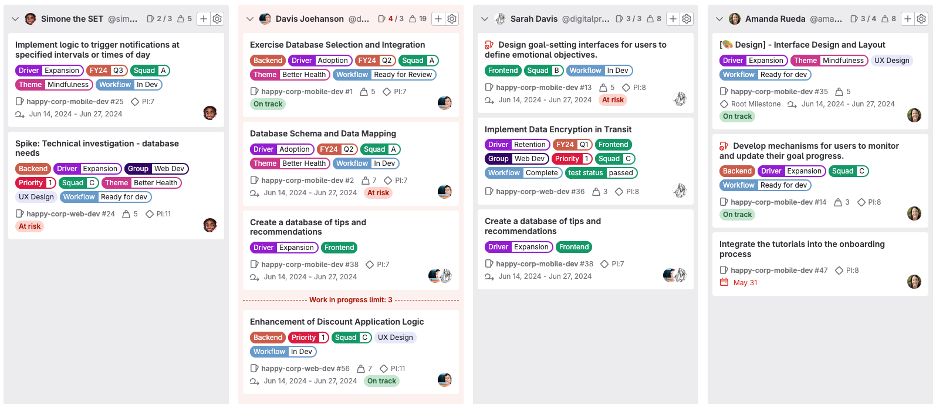
- Boards: Visualize workflows using Kanban boards.
- Roadmaps: Plan long-term initiatives with strategic alignment.
- Iterations and Sprints: Break work into time-boxed cycles for better efficiency.
Figure 1: GitLab Agile Board
Using GitLab Agile Planning for Non-Technical Use Cases
Agile planning is not just for developers. Let’s explore how different teams can leverage GitLab’s Agile features.
1. Marketing Campaign Management
Marketing teams need to coordinate multiple campaigns, track content production, and manage deadlines. Using GitLab:
- Epics represent major campaigns (e.g., “Q2 Product Launch”).
- Issues track individual tasks like blog writing, ad design, and social media posts.
- Boards visualize the content pipeline.
- Milestones help set deadlines for campaign execution.
Figure 2: GitLab Board for Marketing

2. Human Resources (HR) and Recruitment
HR teams can streamline hiring and employee engagement processes with GitLab’s Agile tools:
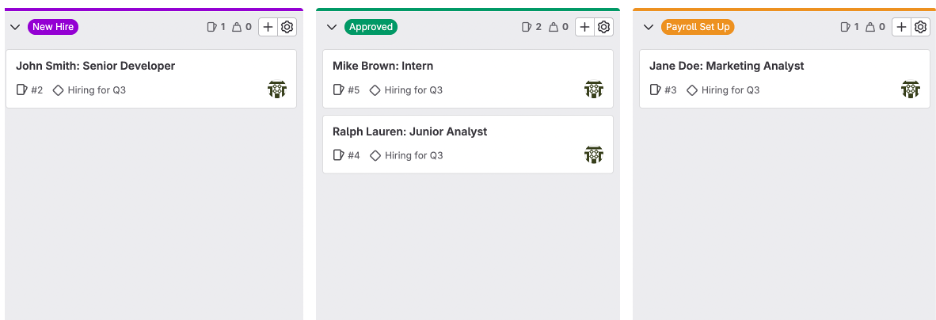
- Epics can represent different HR initiatives (e.g., “Hiring for Q3”).
- Issues can track candidate screening, interviews, and onboarding tasks.
- Milestones help ensure hiring timelines are met.
- Boards enable real-time tracking of candidate progress.
Figure 2: Example HR Onboarding Tracking in GitLab
Final Thoughts
GitLab’s Agile planning capabilities are powerful tools for both technical and non-technical teams. Whether you’re managing a marketing campaign, hiring new employees, planning an event, or tracking financial tasks, GitLab provides a flexible framework to organize work, track progress, and improve collaboration. Are you using GitLab for non-technical Agile planning?